Keyword research is a vast topic that is crucial for blog articles to rank on SERP(Search Engine Results Page), many beginner bloggers don’t have much idea about the tools to perform keyword research and they fail.
But you should not worry as you’ve just come to the right place to learn.
In this blog article, I will be guiding you through conducting keyword research properly using the best tools available on the internet and getting more traffic.
Modern SEO must include keyword research as a key component. Good-quality keywords are one of the most effective ways to drive consistent, high-quality traffic to your website, regardless of whether you’re relaunching an old blog or creating your content strategy for a new one.
What is a Keyword?
A keyword is a term that someone could enter into a search engine like Google or Bing, most frequently a word or a brief phrase.
- Cooking is a keyword -and so are cooking tips for beginners
- iPhone is a keyword -and so is the best camera iPhone in 2023
What is Keyword Research?

The process of discovering and analyzing the search terms individuals use to find information, goods, or services online is known as keyword research.
Finding relevant terms and phrases with a medium-to-high search volume and a moderate amount of competition is the main objective of keyword research. This will allow you to optimize your blog content to rank for those terms, increase the search engine results pages, and do well against other websites in your industry.
Why is Keyword Research Needed?
Keyword research is fundamental as it helps to understand user intent, enhance search engine ranking and so on which helps to boost engagement and traffic.
If you’re new to blogging, start by learning keyword research. It helps you understand the competition and search volume for the terms you want to rank for on Google. This helps you to Start a Profitable Blog more effectively by understanding the traffic intent.
Why Do You Need To Conduct Keyword Research?
Understanding User Intent: Keyword research enables you to comprehend the terminology used by your target market while doing online information searches. You may then adjust your content and marketing initiatives to address the unique questions, problems, and requirements that your audience has.
Enhancing Search Engine Rankings: You may raise the visibility of your website in search engine results pages (SERPs) by incorporating the appropriate keywords into your content and metadata. You could increase the organic traffic to your website by doing this.
Creating Relevant Content: Identifying the topics and subtopics that your target audience is interested in via keyword research will help you create content that is relevant to them. This might assist you in producing more pertinent and interesting material that appeals to your audience.
Competitive Analysis: Keyword research can also help you identify the keywords that your competitors are targeting. This might help you learn more about their content and marketing methods and spot chances to set yourself apart from the competition.
While reading this blog article you may be overwhelmed by keyword research and search engine ranking. But the good news is that there are a lot of tools that assist you in performing keyword research effectively and getting your post ranked on the search results page.
Let’s Dive Into The Premium Keyword Research Tools First:
1. Semrush
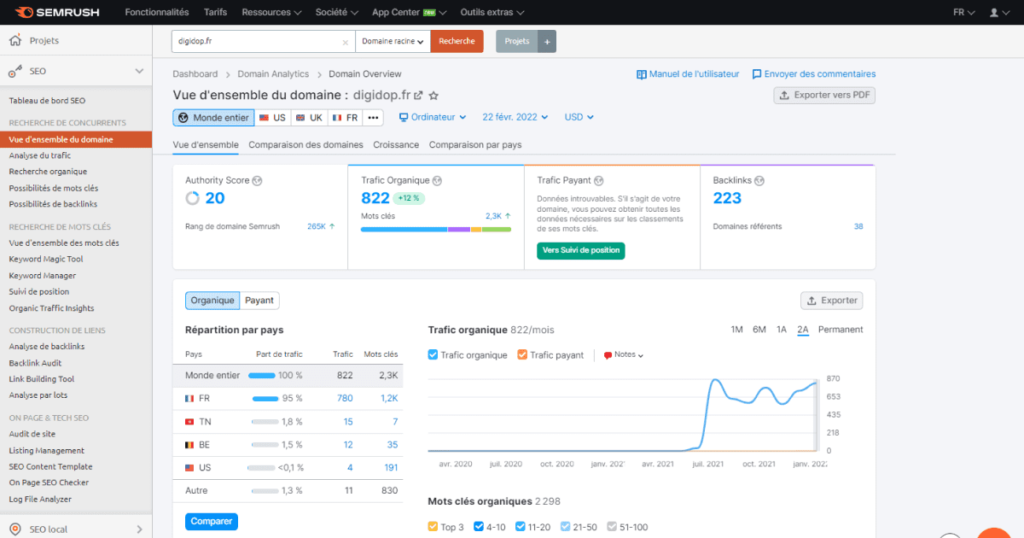
One of the most widely used marketing platforms for premium keyword research is Semrush. You can use its many beneficial tools and reports to assist you with keyword research and local SEO, social media management, content marketing, website audits, and other tasks.
Semrush makes it simple to get information about SERP aspects and in-depth analyses of recent results while providing more sophisticated keyword data. Additionally, you can research the rankings of your rivals and the keywords they utilize for PPC and organic SEO. The All-in-One SEO Plugin’s ability to use Semrush to extract more keywords from WordPress is its strongest feature.
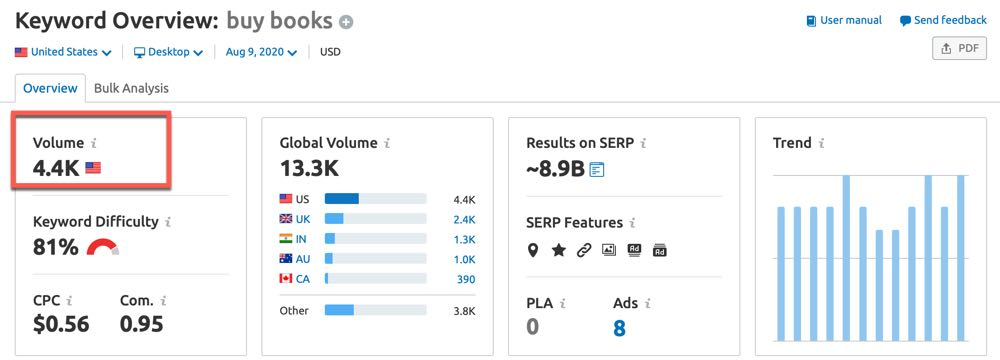
These keyword data are obtained in-depth:
- Keyword traffic volume
- Keyword difficulty score
- Search engine reports
- Adsense CPC
- Other so many details that you require to do search research properly
Pricing (Billed Annually): Pro ($99.95/month), Guru ($191.62/month), and Business ($374.95/month)
2. SE Ranking
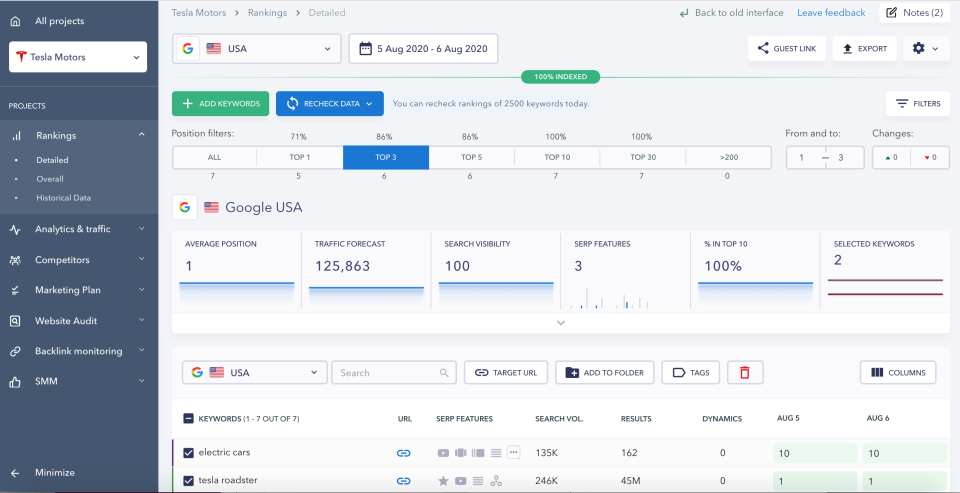
A strong all-in-one SEO software called SE Ranking offers a lot of keyword data and makes it simple to examine SERP features and recent website results. The tool provides a comprehensive range of keyword research functions, including competitive keyword gap analysis, position tracking, and the usual search volume data and traffic analysis.
Competitive analysis is SE Ranking’s primary area of focus. Compare a list of keywords used by your rivals and evaluate them using key SEO criteria like search volume, keyword difficulty, ranks, CPC, etc. The tool includes a representation of your competition and offers comprehensive data divided into sections for organic and sponsored search.
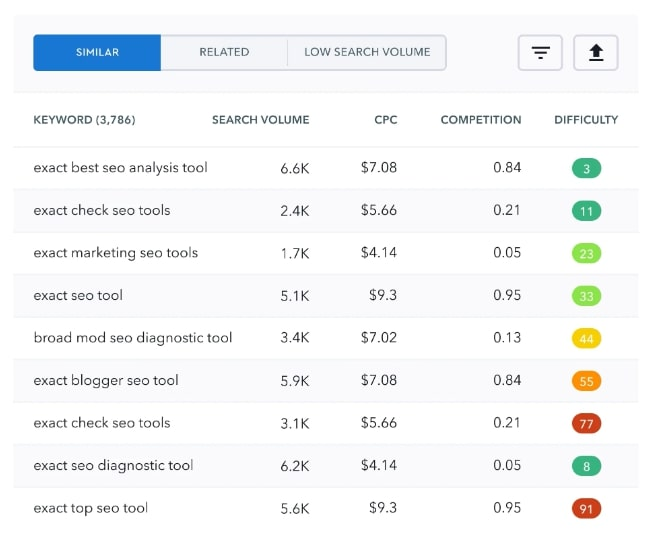
Pricing: SE Ranking has a special pricing system where plan prices vary based on the frequency with which you wish to check your ranks, the length of the subscription, and the number of keywords to track.
With weekly tracking, the Essentials plan is the least expensive at $23.52 per month (paid annually).
3. KW Finder by Mangools
KWFinder is a useful tool for novice and experienced SEO users on a tight budget to uncover easy-to-rank keywords. The tool offers all of your keyword fundamentals, including long-tail variations, suggestions, search volume, CPC, SERP analysis, and website analysis, with an intuitive interface. You can conduct a search using a keyword, location, or domain.
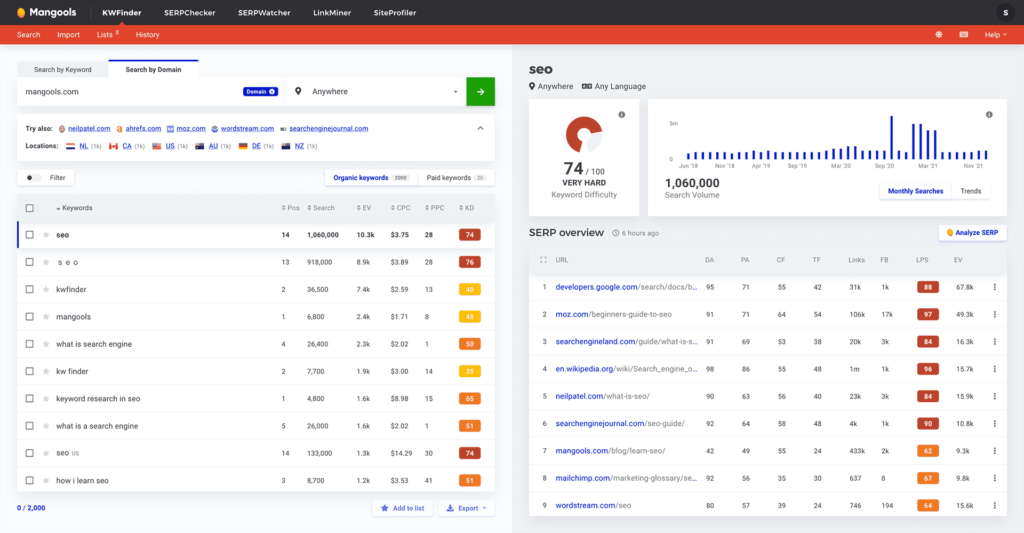
Obtaining search volumes using historical data is a cool feature. You can use it to determine seasonal keywords and popular subjects, which will aid in generating content based on long-term trends and boosting website traffic. Five keyword lookups, ten competitors, and twenty-five related keywords are permitted in the free edition.
Pricing (Billed Annually): Basic ($29.80/month), Premium ($39.90/month), and Agency ($79.90/month)
4. Ahrefs Keywords Explorer Tool:
One of the most popular keyword tools available is Ahrefs. They go into great detail, including the difficulty of the keywords, which I like. Ahrefs uses clickstream data to estimate your expected search engine clickthrough rate. To come up with ideas for Google, Bing, Amazon, YouTube, and a few more search engines, use the Keyword generator tool.
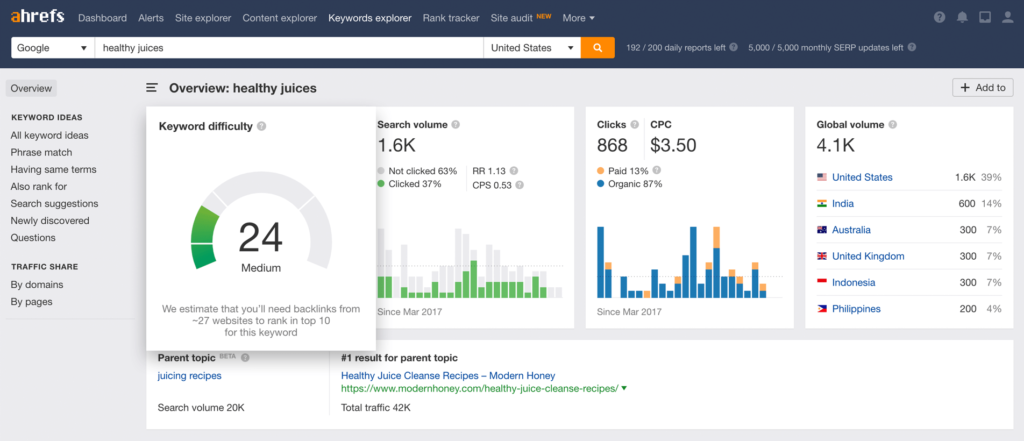
After knowledge graph integration, this is quite helpful because many terms may have high traffic levels yet receive relatively few clicks from search engines. The explanation for this is that they receive responses directly from a Google search result. “Birthdate of any celebrity” is an illustration of one such question.
The excellent user interface and the wealth of information offered by Ahrefs’ keyword research tool are further features that set it apart. Ahrefs offers many additional features, including, to mention a few, Backlink analysis and SEO site assessment.
Additionally, you may simply generate a list of target keywords from the Ahrefs dashboard. Excel is not necessary here so, it saves you valuable time.
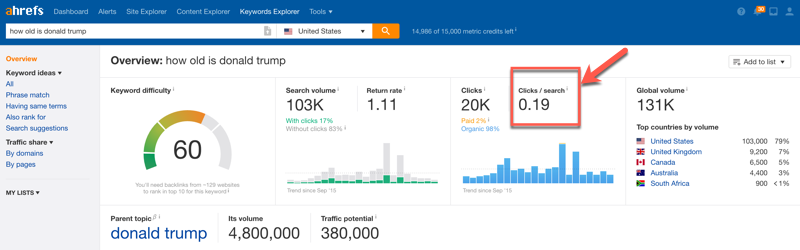
Pricing: There are four pricing tiers for Ahrefs. If you choose an annual payment plan, the pricing for independent contractors, internet marketers, mid-sized businesses, and larger brands starts at just $83 per month.
A trial offer is included for the Lite and Standard subscription plans at $7 for seven days.
5. WebCEO
WebCEO is yet another fantastic resource for thorough keyword research. Using the built-in keyword suggestion tool, you can quickly uncover article ideas from a variety of sources. To assist you in deciding whether to target your keyword phrases or not, it provides several useful information, including worldwide monthly searches, the average cost per click, bid competitiveness, and more.
You may track the past 12 months’ worth of search patterns for a specific keyword using WebCEO. The program pulls keyword information from sources such as People Also Ask, Google Autocomplete, and Google Keyword Planner.
Finding profitable keywords that are already being used by your competition is another amazing function. To promote a local business, WebCEO’s Local Keyword Analysis tool also offers more precise keyword suggestions for any region and location of your choice.
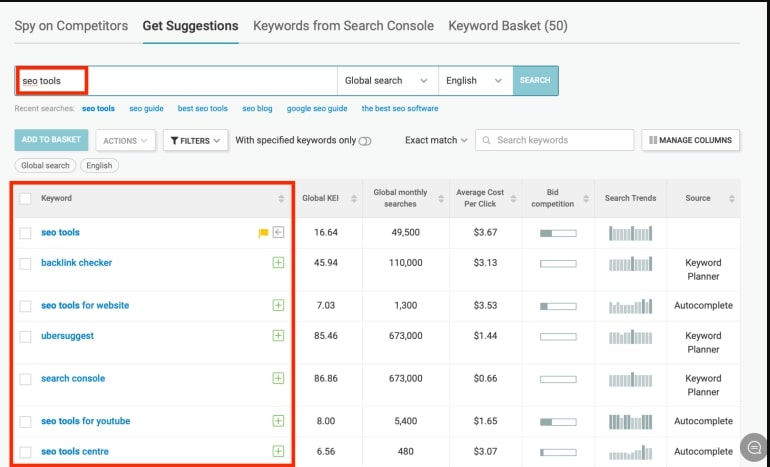
Pricing: Free Trial (14 days) Solo: $37 per month (3+ month subscription)
Startup: $99 per month & Corporate: $299 per month
6. SEO Powersuit
SEO PowerSuite is an assortment of SEO tools that happen to comprise a keyword tool. Speaking more precisely, you’ll need the Rank Tracker tool to find the greatest keyword suggestions for your website.
Despite having 23 keyword research tools combined into one platform, it is still referred to as a rank tracker. Google Adwords, Google Autocomplete, Google Analytics, Google Search Console, Yahoo Search Assist, and Bing Related Search are just a few of the keyword research tools you can choose from.
Important statistics like keyword difficulty, search volume, and Alexa ranking will be shown.
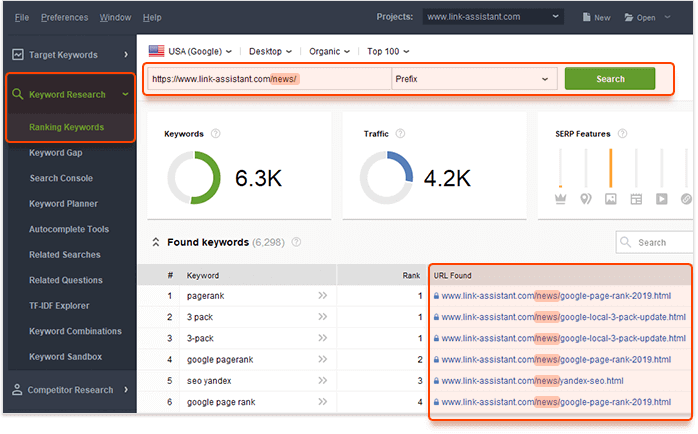
By using SEO PowerSuite, you can also keep tabs on your rivals. It keeps tabs on the keyword strategies of your competitors and informs you of the terms they now rank for.
It’s also important to note that keyword checking can be automated. Simply set up a schedule, and SEO PowerSuite will begin operating behind the scenes. No longer do you need to manually check keywords.
The fact that SEO PowerSuite may be customized with white-label solutions is its strongest feature. If you own an SEO agency, this means you may use it to deliver reports to clients. Additionally, you can deliver client reports automatically by utilizing the same automation capability.
Pricing (Paid annually): Professional ($299/year) and Enterprise ($499/year)
Let’s Have a Look At The Keyword Search Tools That Help You Do Basic Keyword Research:
7. WordStream’s Free Keyword Research Tool
WordStream is a simple keyword research tool that provides a variety of advertising and SEO-related services. However, its free keyword search tool is still available to you.
Simply add a keyword or the URL of your website to use their free tool. Then you’ll see a list of findings that you can download for future use. You must create a free WordStream account to download them.
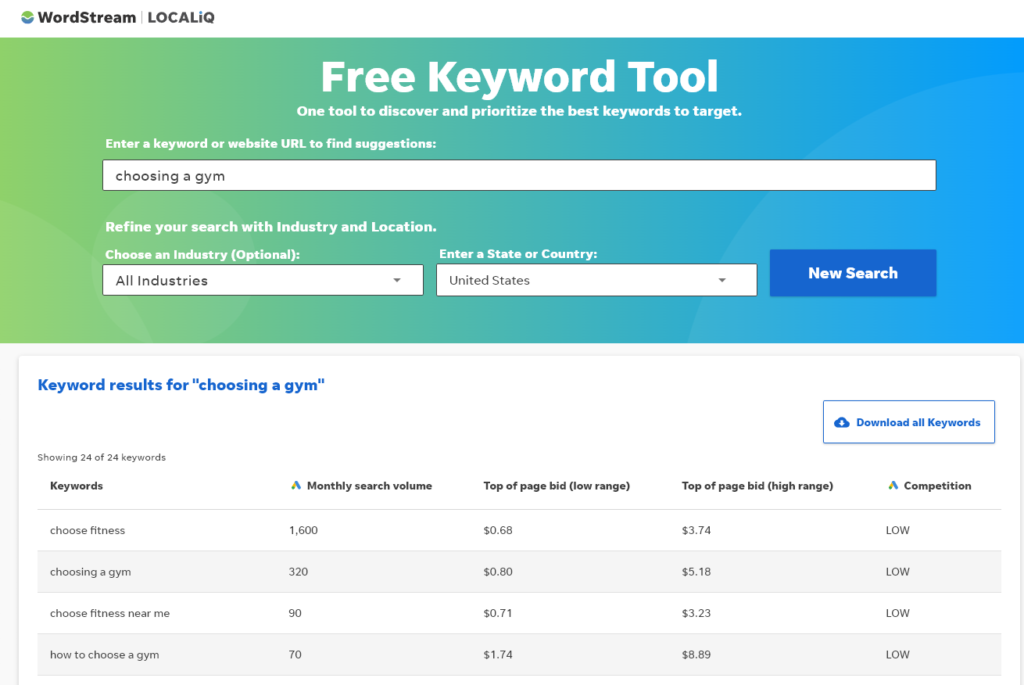
The WordStream tool not only displays search traffic and competition but also provides estimates of how much you would likely need to pay to advertise your page at the top of Google’s first result page for a particular phrase. Unless you wish to run advertisements, you may ignore these numbers as a blogger, but they’ll give you a good notion of how competitive a certain keyword phrase will be.
8. Google Keyword Planner
The Google Keyword Planner is a free tool designed for advertisers who want to rank their page above organic search results by running PPC Search campaigns through Google Ads.
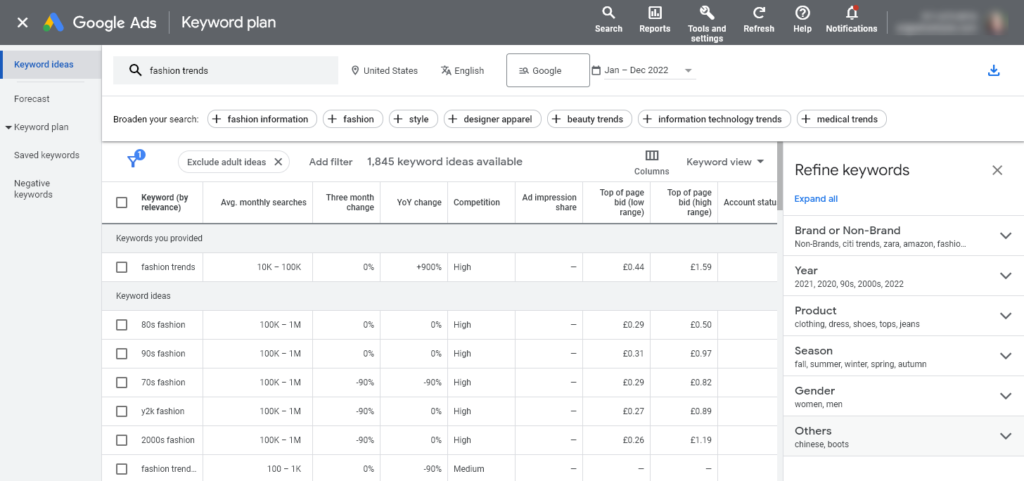
You’ll need a free Google account to utilize it. The Google Ads homepage will then prompt you to log in. You must set up an advertisement and input your credit card information; after doing so, immediately pause the advertisement in your ad settings.
Following that, you can always use Google Keyword Planner for free. In your Google Ads account, it is located under Tools and Settings Planning.
The options to “Discover new keywords” and “Get search volume and forecasts” are accessible to you. You have a ton of options for filtering Google Keyword Planner’s suggested keywords (you can see this under “Refine keywords” on the right). Your starting keyword will affect the many filters you see here.
9. Moz’s Keyword Explorer
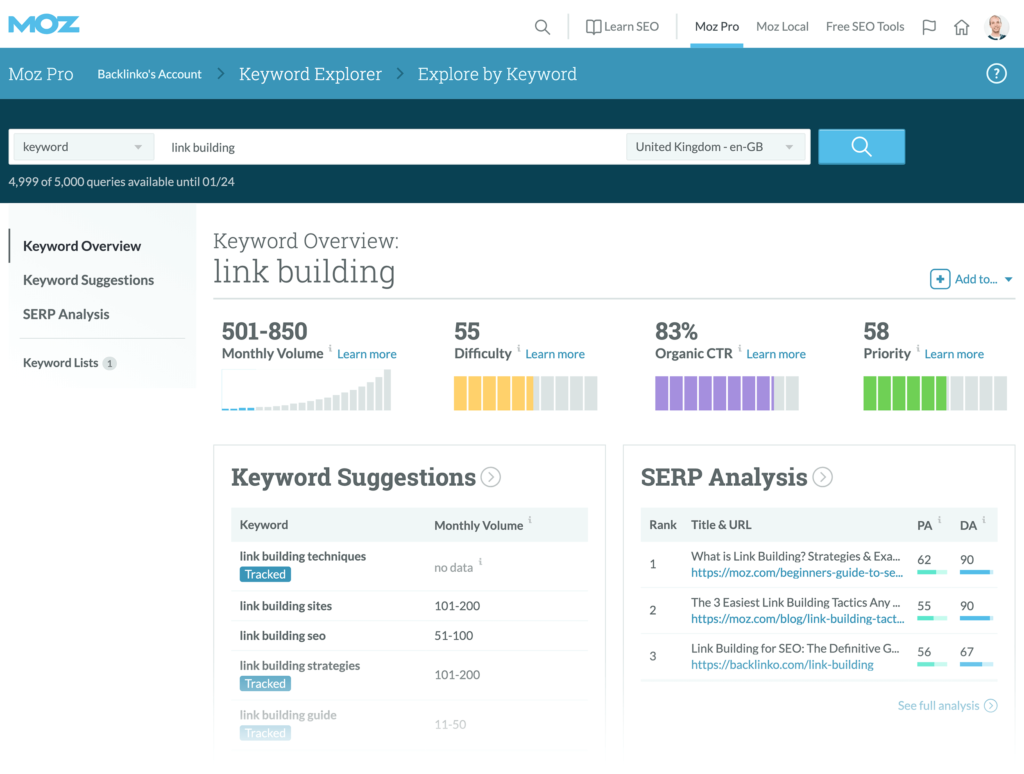
Moz’s Keyword Explorer is not the best solution, though, if you want to scale your blogging approach using solely free tools because it limits you to just 10 queries every month.
In addition to providing you with the organic CTR (click-through rate) and a priority grade, Keyword Explorer also displays monthly volume and a difficulty rating. The highest priority keywords will increase your chances of success because they fall into the “sweet spot” of higher volume and organic CTR with less trouble.
10. Google Trends
Google Trends is the tool you need if you want to quickly determine whether a keyword is growing in popularity or losing ground. When you’re developing long-term cornerstone material for your site, it can come in handy because it can show you which keywords are growing upward versus downward.
Simply input one or more search terms and select the period you wish to examine to begin using Google Trends. You may use Google Trends to look up seasonal keywords in your niche in addition to noticing keywords that are growing in popularity over time.
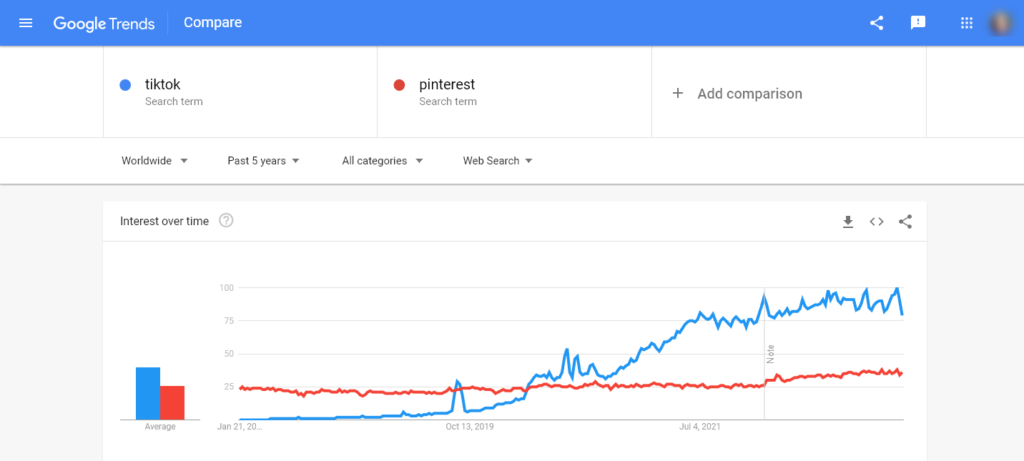
Although Google Trends will directionally show you the popularity of a search phrase over time and it helps to determine whether or not a specific topic is trending up or down in popularity, I wouldn’t personally recommend utilizing it as a source for deep keyword analysis.
Wrapping it Up:
In conclusion, for bloggers and marketers aiming to increase their website traffic in 2023, having the appropriate keyword research tools at your disposal is essential. You can gain useful information and find untapped chances to improve your online presence by implementing these tools into your content strategy. There is a tool available to suit every budget and requirement, whether you choose the robust functionality of paid solutions or the simplicity of free alternatives. Remember that doing great keyword research involves more than just increasing traffic—it also involves knowing your audience and creating engaging content for them.
Utilize the strength of these top 10 tools for keyword research and watch your website flourish in the digital environment of 2023 and beyond with better visibility, improved ranks, and finally, greater success.